Install the app on a smartphone

Get uninterrupted access to our service no matter where you are
Install the app
Add page to favorites
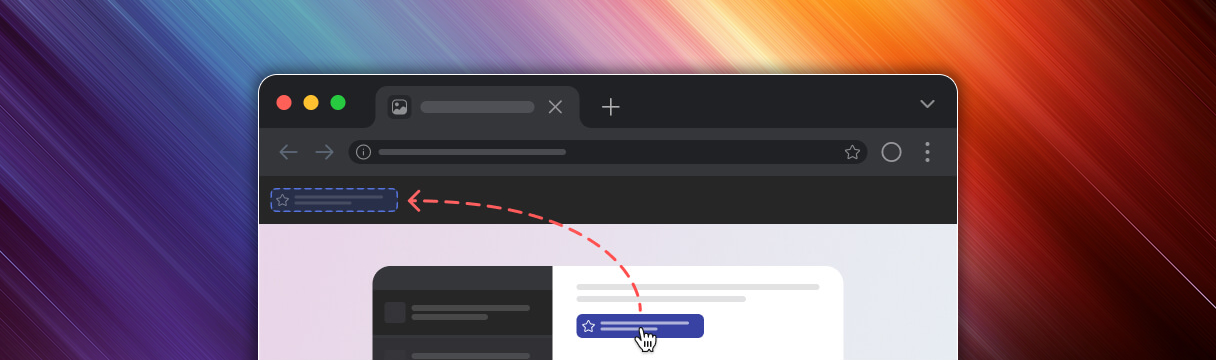
Click and grab the icon to drag it to your browser's bookmarks as shown above.
How to enable the bookmark panel in the browser
Click the icon in the top right corner
Select
Bookmarks and lists →
Show bookmark panel
Click on the ⋯ icon in the upper right corner → Favorites → ⋯ → Show favorites panel → Always
In the upper right corner, click the icon ≡ → Bookmarks → Show bookmarks panel
Click the Opera logo in the upper left corner → Bookmarks → Display bookmarks panel
In the browser menu, click View → Show the Favorites bar
In the upper right corner, click the icon ≡ → Bookmarks → Show bookmarks bar → Always
In the upper right corner, click the ≡ → Bookmarks → Show bookmarks panel icon
Subscribe to our Telegram channel

Pinned messages always have links to working mirrors and information about bonuses and promotions.
Anweisungen
Click the Go to Telegram button
Then click Open Telegram Desktop
The chat will open in the Telegram app
Click the Join Channel button
Go to Telegram
Use VPN services

Popular services:
Use the Opera browser with a VPN

To avoid losing access to our site, use the Opera browser with its built-in ad blocker and free VPN.
How to enable the VPN in the Opera browser:
On the page that opens, select the Security tab
Check the flag next to Turn On VPN
Download Opera